
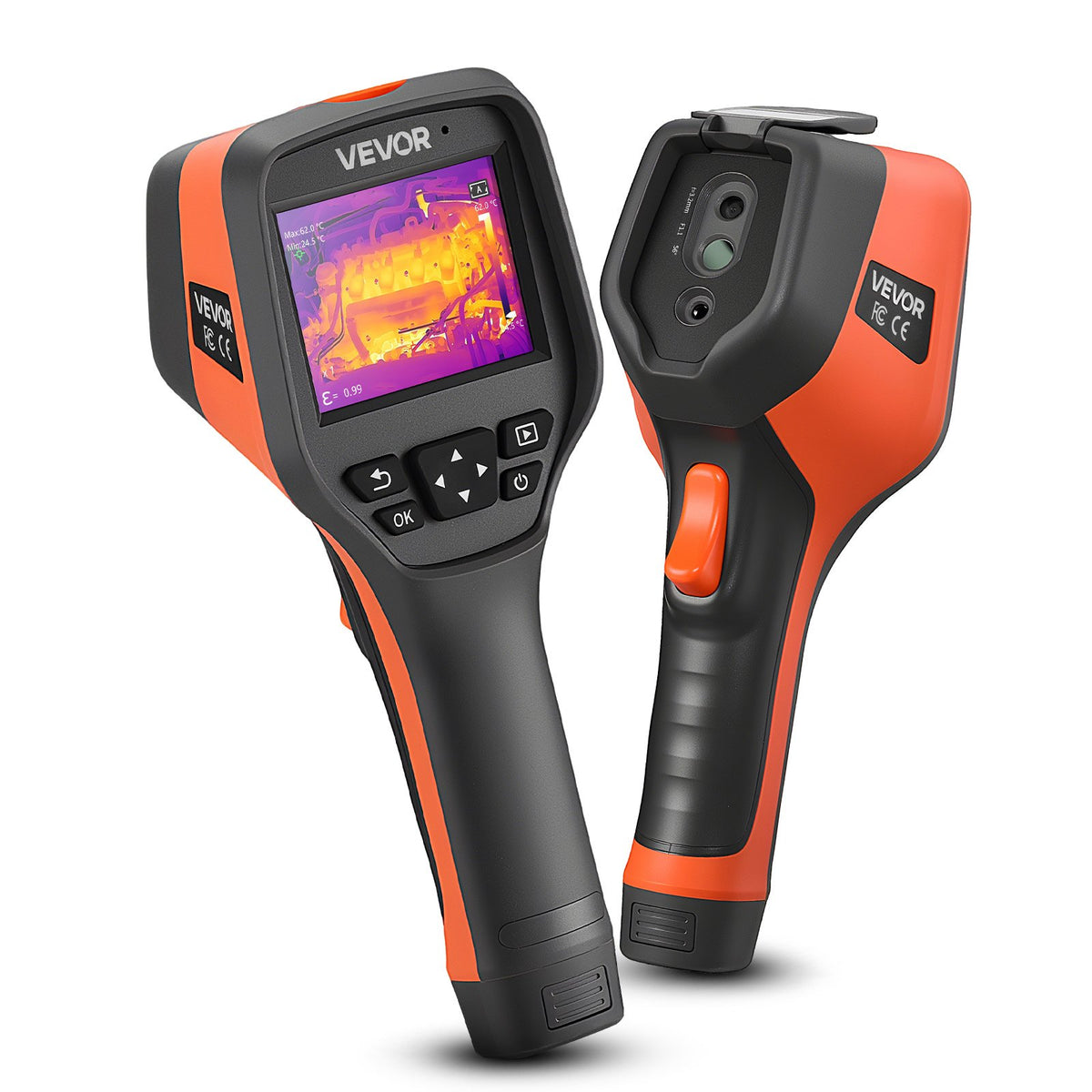
VEVOR Pro Handheld Thermal Imaging Camera, 512×384 TISR, 3.45-inch Display
Available to order
Included with qualifying purchases of $100 or more. Coverage begins on delivery and protects against manufacturing defects and failures under normal use.
- 30-Day ReturnsHassle Free
- 2-Year WarrantyOn qualifying $100+ purchases
30-day returns and damage protection Return most items within 30 days. If your order arrives damaged, we will replace it or refund you. Free shipping on every order.
Product details
The VEVOR Pro is a standalone handheld thermal camera with a large 3.45-inch screen, a 2 MP visible camera and 512×384 TISR super-resolution output. It measures from -4°F to 1,022°F and offers four image modes and seven color palettes for HVAC, electrical and building inspection.
At a glance
- 512×384 TISR super-resolution thermal output
- 3.45-inch LCD and 2 MP visible-light camera
- 25 Hz refresh rate
- -4°F to 1,022°F (-20°C to 550°C)
- 4 image modes and 7 color palettes
Full specifications
- Thermal image output: 512×384 (TISR super-resolution)
- Visible camera: 2 MP
- Refresh rate: 25 Hz
- Temperature range: -4°F to 1,022°F (-20°C to 550°C)
- Display: 3.45-inch LCD
- Image modes: 4
- Color palettes: 7
- Form: standalone handheld, no phone needed
What the specs mean in practice
TISR output. TISR is an image-enhancement process, so 512×384 describes the processed picture rather than the raw sensor. Its benefit is cleaner edges and easier-to-read detail on screen.
Screen size. A 3.45-inch display is noticeably larger than the 2.4 to 2.8-inch screens on most budget handhelds. It makes it easier to read a scene on site and to see small hot spots without squinting.
Visible camera. The 2 MP camera gives you a normal-light view of what the thermal image shows, which helps identify components and write up findings.
What you can use it for
- HVAC: check coils, ducts, burners and refrigerant lines.
- Electrical: scan panels, breakers and motors for abnormal heat.
- Buildings: find insulation gaps, air leaks and moisture patterns.
- Automotive and workshop: check exhaust, brakes and cooling systems.
Who should look elsewhere
- You want the smallest possible pocket tool. See our phone cameras.
- You need a ruggedized body for harsh job sites. The UNI-T UTi260B is rated IP65 with 2 m drop resistance.
How it compares
- MILESEEY TR20: 320×240 at 50 Hz with 40 mK or better sensitivity.
- UNI-T UTi260B: 256×192 with fusion mode and a tougher IP65 body.
Tips for better results
- Scan electrical equipment under normal load and compare like with like.
- Shiny bare metal reads cooler than it really is. Measure a patch of black electrical tape instead.
- Glass blocks thermal imaging, so you see the glass surface and not what is behind it.
- Switch palettes to suit the job: high-contrast palettes make hot spots stand out, while grayscale shows fine surface detail.
Frequently asked questions
What does TISR super-resolution do?
It processes the thermal image to output 512×384, which sharpens edges and detail compared with the raw sensor image.
What is the temperature range?
-4°F to 1,022°F, enough for most electrical panels, motors and HVAC equipment.
Does it need a phone?
No. It has its own screen and works on its own.
How many display modes does it have?
Four image modes and seven color palettes.
Can it see through walls?
No. It shows surface temperature, not what is behind a surface.
Common applications
Building inspections, Electrical troubleshooting, HVAC maintenance. Choose a thermal camera based on the target size, working distance and required measurement accuracy.
Buying guidance
Compare native infrared sensor resolution, temperature measurement range and device compatibility before ordering. Image enhancement does not increase native sensor resolution. For questions about suitability, contact ThermalVisionPlus before purchase.
Explore our thermal imaging buying guides
Read our home inspection guide, electrical inspection guide, and phone versus handheld comparison to compare specifications and applications.